Medication Titration & Tapering
What is Medication Titration & Tapering?
Medication titration and tapering are commonly used medication-management approaches in healthcare when a patient’s medication dosage needs to be adjusted gradually over a defined period. These approaches allow prescribers to establish a structured dosage schedule based on the patient’s treatment plan, clinical response, tolerance, or other relevant considerations.
Titration refers to the gradual adjustment of a medication dosage, which may involve increasing or decreasing the dose over time to achieve the intended therapeutic effect while considering patient tolerance and potential side effects.
Tapering is a specific type of gradual dose reduction in which the medication dosage is systematically decreased over a defined period. Depending on the medication and clinical circumstances, tapering may be used when a medication needs to be reduced or discontinued gradually rather than stopped abruptly.
The appropriate titration or tapering schedule varies depending on the medication, patient characteristics, clinical condition, treatment goals, and prescriber’s instructions.
Common Clinical Applications
Clinical Area — Example Use Case
- Mental Health — Gradually adjusting certain medications based on the patient’s response and tolerance, or reducing the dosage as part of a planned tapering schedule.
- Diabetes Management — Adjusting medication doses based on blood glucose levels and the patient’s response to treatment.
- Cardiovascular Care — Gradually adjusting certain medications to achieve treatment goals while monitoring patient response and tolerance.
- Pain Management — Adjusting certain medications to achieve the intended therapeutic effect while managing potential side effects, or gradually reducing the dose when clinically appropriate.
- Neurology — Gradually adjusting certain medications based on treatment response or following a structured dose-reduction plan when discontinuation is appropriate.
Titration vs. Tapering
Although both involve gradual medication-dose adjustments, their purposes can differ:
- Titration: The medication dosage is gradually adjusted, either upward or downward, according to the prescriber’s treatment plan.
- Tapering: The medication dosage is gradually reduced according to a defined schedule, typically when the treatment plan calls for a controlled reduction or discontinuation.
Medication Titration & Tapering in H2H Digital Rx
- H2H Digital Rx’s Titration & Tapering feature helps prescribers create structured, step-by-step medication instructions within the prescription’s SIG (Signa) field.
- For medications that require gradual dosage adjustments, manually entering the complete dosage schedule in the SIG field can be time-consuming and may result in complex or inconsistently structured instructions.
- The H2H Digital Rx workflow allows prescribers to define the required dosage progression or reduction by providing parameters such as the starting dose, dosage change, frequency, and duration. Based on these inputs, the system generates a structured schedule and corresponding SIG directions.
- This helps the prescriber clearly communicate the intended medication dosage progression or reduction throughout the treatment period.
Example: Medication Titration
Consider a patient whose medication requires a gradual dosage increase over several weeks. The prescriber can define a stepwise dosage schedule rather than manually entering each stage of the instructions.
Illustrative example:
| Treatment Period | Medication Dosage | Instructions |
|---|---|---|
| Days 1–7 | 25 mg | Take once daily |
| Days 8–14 | 50 mg | Take once daily |
| Days 15–21 | 75 mg | Take once daily |
| Day 22 onward | 100 mg | Take once daily, as directed by the prescriber |
This is an illustrative example of a titration schedule and is not a medication-specific treatment recommendation.
Example: Medication Tapering
A tapering schedule follows the same concept of structured dose adjustments but focuses specifically on gradually reducing the medication dosage.
Illustrative example:
| Treatment Period | Medication Dosage | Instructions |
|---|---|---|
| Days 1–7 | 100 mg | Take once daily |
| Days 8–14 | 75 mg | Take once daily |
| Days 15–21 | 50 mg | Take once daily |
| Days 22–28 | 25 mg | Take once daily |
| Day 29 onward | As directed | Follow the prescriber’s discontinuation instructions |
This is an illustrative example of a tapering schedule and is not a medication-specific treatment recommendation.
How H2H Digital Rx Supports Titration & Tapering
When creating a prescription, the prescriber must provide medication directions in the SIG field, including the dosage, frequency, duration, and other relevant administration instructions.
For prescriptions involving multiple dosage phases, manually creating these instructions can be cumbersome. The H2H Digital Rx Titration & Tapering feature simplifies this process by allowing the prescriber to define the dosage adjustment parameters through a guided workflow.
Based on the prescriber’s inputs, H2H Digital Rx generates a structured schedule and corresponding SIG directions. The prescriber can review the generated schedule before applying it to the prescription.
The prescriber can also make any necessary edits to the SIG field directly on the Rx Pad before proceeding with the prescription.
Steps to Use the Titration & Tapering Feature in H2H DRx
Step 1: Access the Titration & Tapering Feature
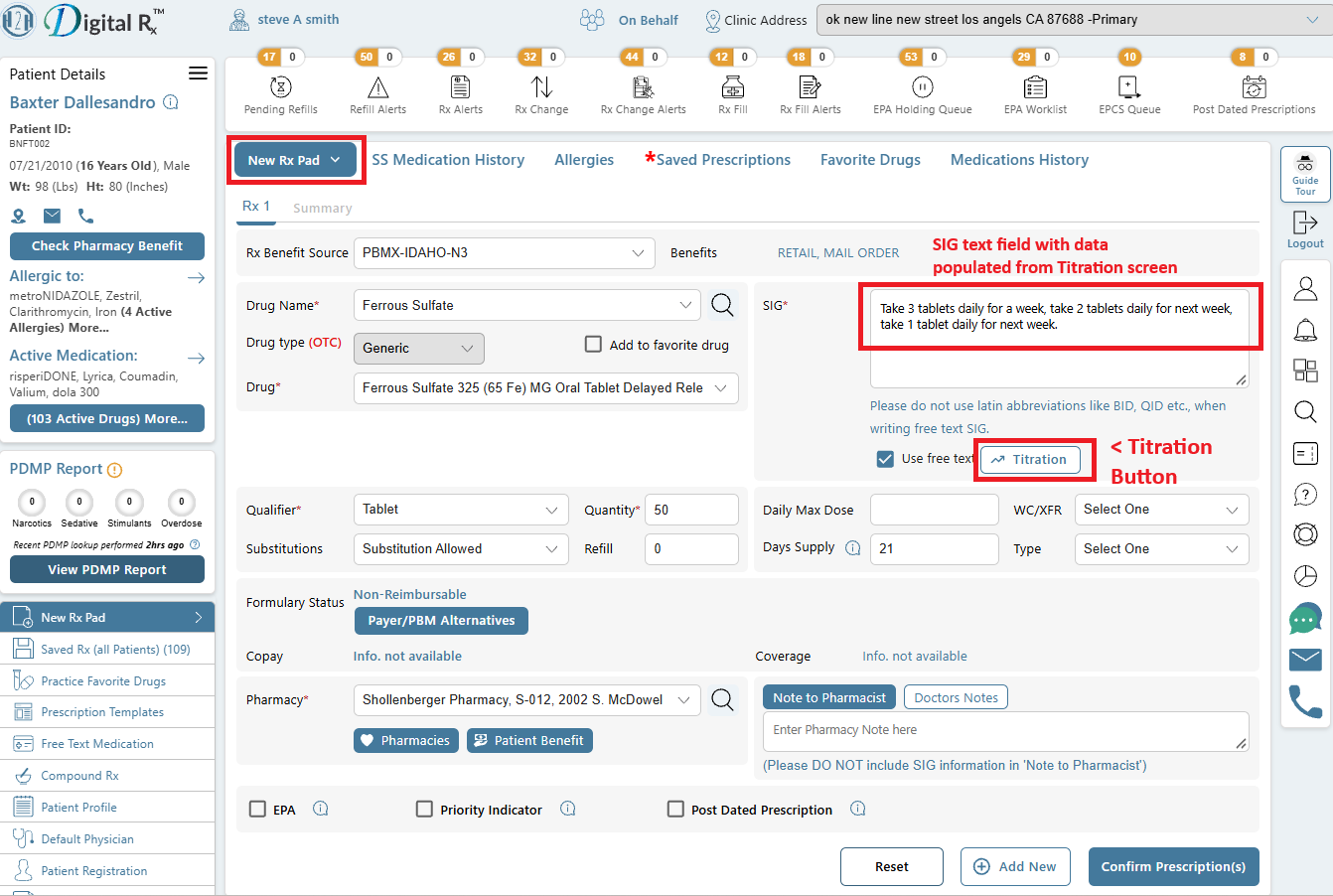
The Titration button will be displayed on the Rx Pad for the prescriber, as shown in the screenshot.
Step 2: Select the Dosage Adjustment Mode
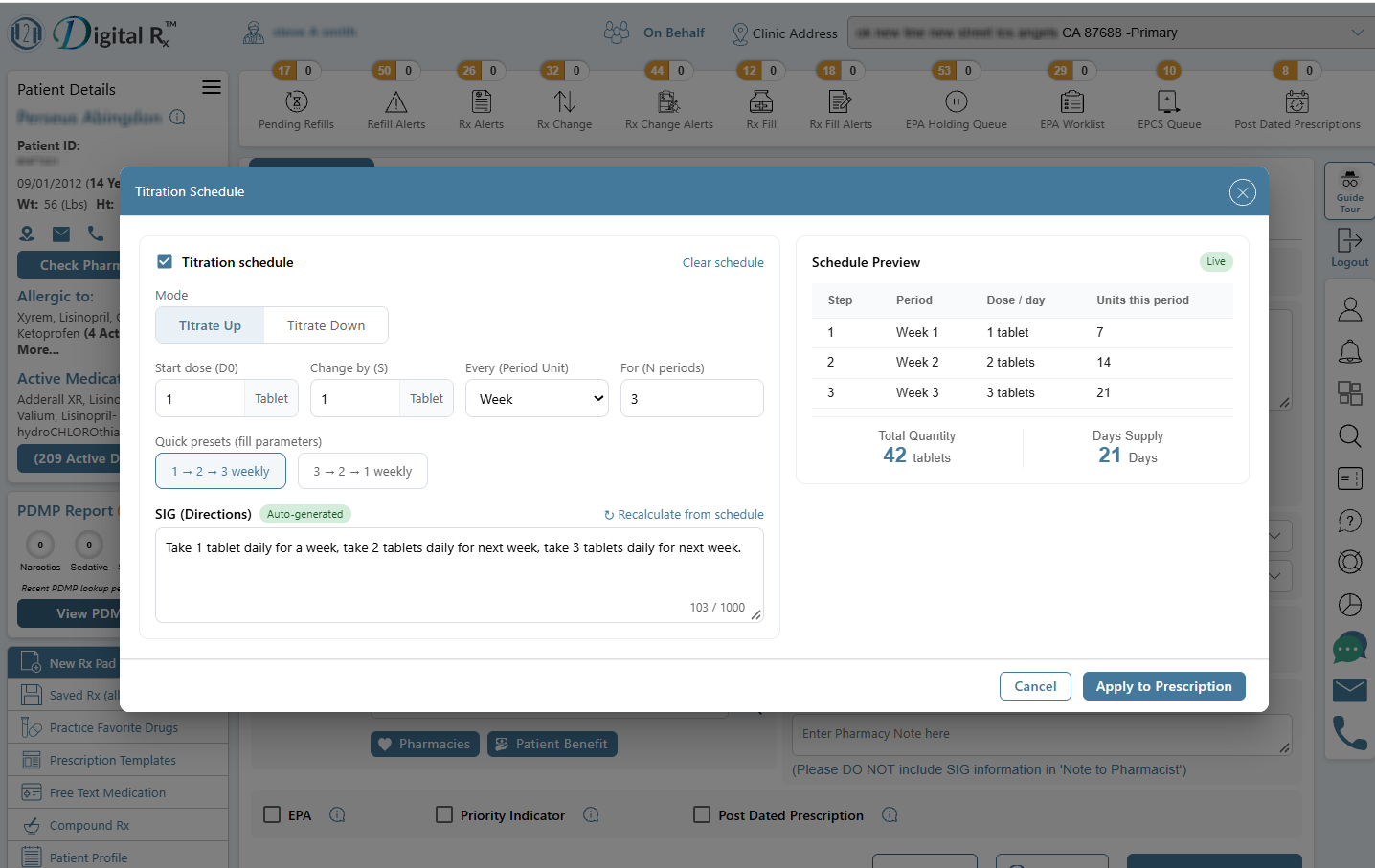
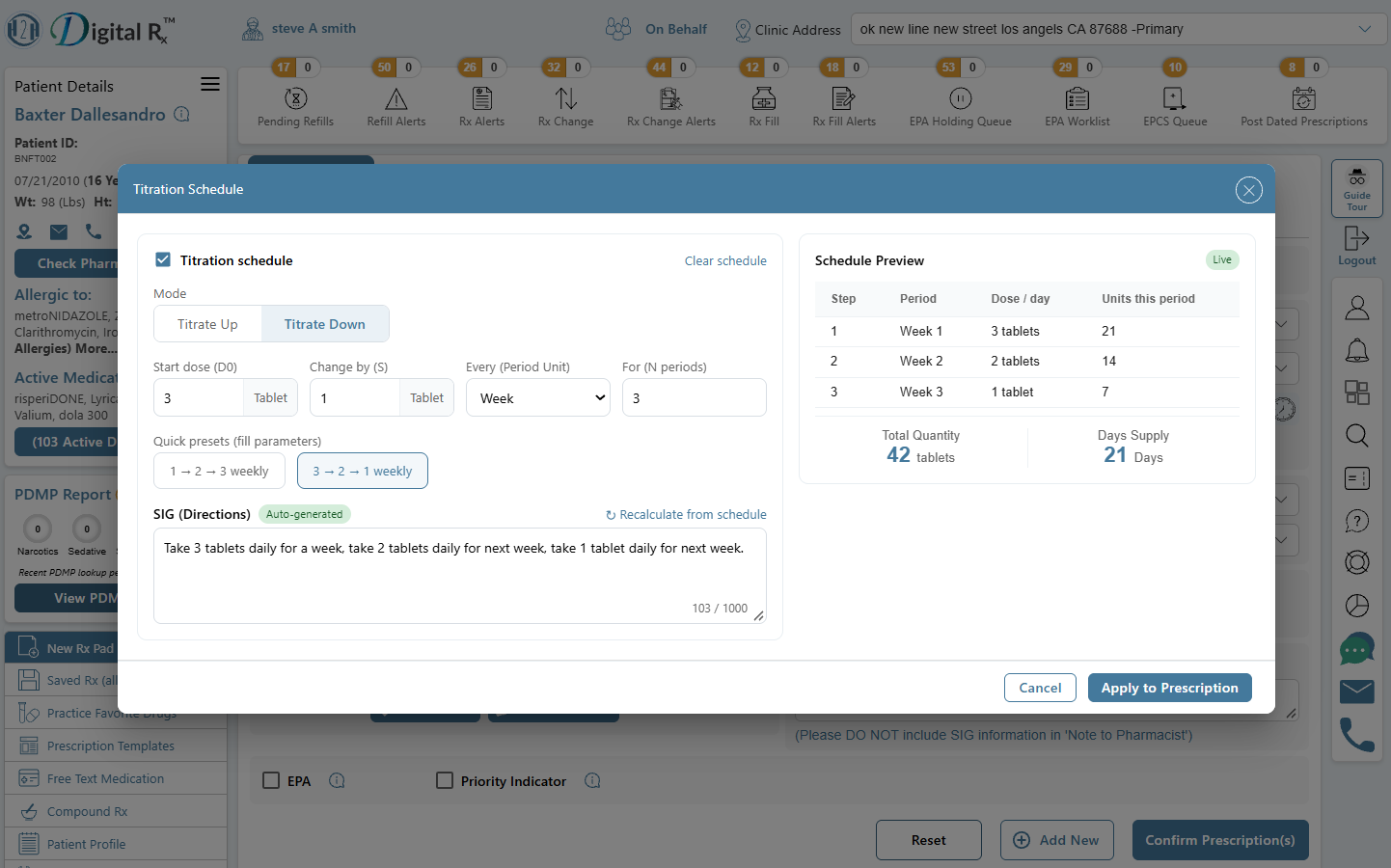
Based on the patient’s treatment plan, the prescriber can click the Titration button to open the Titration & Tapering screen.
The prescriber can then select the appropriate dosage-adjustment mode:
- Titrate Up – Gradually increase the medication dosage.
- Titrate Down / Taper – Gradually decrease the medication dosage according to the defined schedule.
Step 3: Enter the Required Parameters
For the selected mode, the prescriber can define the required dosage-adjustment parameters:
- Start Dose
- Change By
- Period Unit – Defines the frequency or interval of the dosage adjustment.
- For the Period – Defines how long the selected dosage should be maintained before the next adjustment.
Step 4: Use Quick Presets (Optional)
The prescriber can use the available Quick Presets to quickly define commonly used dosage increases or decreases.
These presets can help simplify the creation of the titration or tapering schedule.
Step 5: Review the Generated Schedule and SIG Directions
Based on the parameters entered, the system will generate the corresponding dosage schedule.
The SIG directions will be automatically populated in the SIG free-text field, and the Schedule Preview will be displayed on the right side of the Titration Schedule window.
The prescriber can review the schedule and verify that it accurately reflects the intended medication dosage progression or reduction.
Step 6: Apply the Schedule to the Prescription
After reviewing the schedule preview, the prescriber can click Apply to PRESCRIPTION.
The generated SIG directions will then be populated in the SIG field on the Rx Pad.
Step 7: Review and Edit the SIG
The prescriber can review the generated SIG directions directly on the Rx Pad and make any necessary changes or adjustments before proceeding with the prescription.
This provides the prescriber with an opportunity to verify the final prescription instructions before sending the prescription.